How attackers chain trusted business platforms together to make credential theft look like routine work
Key Takeaways
- Attackers are increasingly chaining multiple trusted enterprise brands into a single phishing journey rather than impersonating a single vendor.
- The campaign uses workflow realism, not just visual realism. The sequence mirrors how employees review documents, share files and authenticate across SaaS platforms.
- Browser-in-the-browser (BitB) is no longer being deployed as a standalone technique but as the final stage of a broader trust-building process that includes personalization, CAPTCHA filtering and OAuth-themed authentication cues.
Barracuda Research has analyzed a multi-layered, multi-brand phishing campaign that reflects a trend for attackers to embed authentication requests inside familiar business workflows. Similar to platforms such as Kali365, which we recently reported on, the objective is to make authentication appear a routine step in a document-sharing, signing or collaboration process.
However, unlike Kali365’s device-code phishing and token-focused attacks, this campaign relies on browser-in-the-browser (BitB) deception to harvest credentials directly.
The attackers combined DocuSign impersonation, victim-specific branding, CAPTCHA-based evasion, an Adobe Acrobat-themed authentication prompt, and a BitB credential-harvesting page. Each stage was designed to build trust, reduce detection and make the final credential request appear routine.
None of these techniques are new on their own, but by chaining together multiple trusted services the attack closely resembles legitimate document-sharing and authentication workflows commonly used in modern organizations.
How the attack unfolds
Stage 1: A personalized DocuSign lure
The attack begins with a DocuSign-themed email prompting the recipient to review and sign a document. Unlike many phishing emails, the sender display name is customized using the recipient organization’s own domain, for example: examplecompany.com – Automated Delivery Centre.
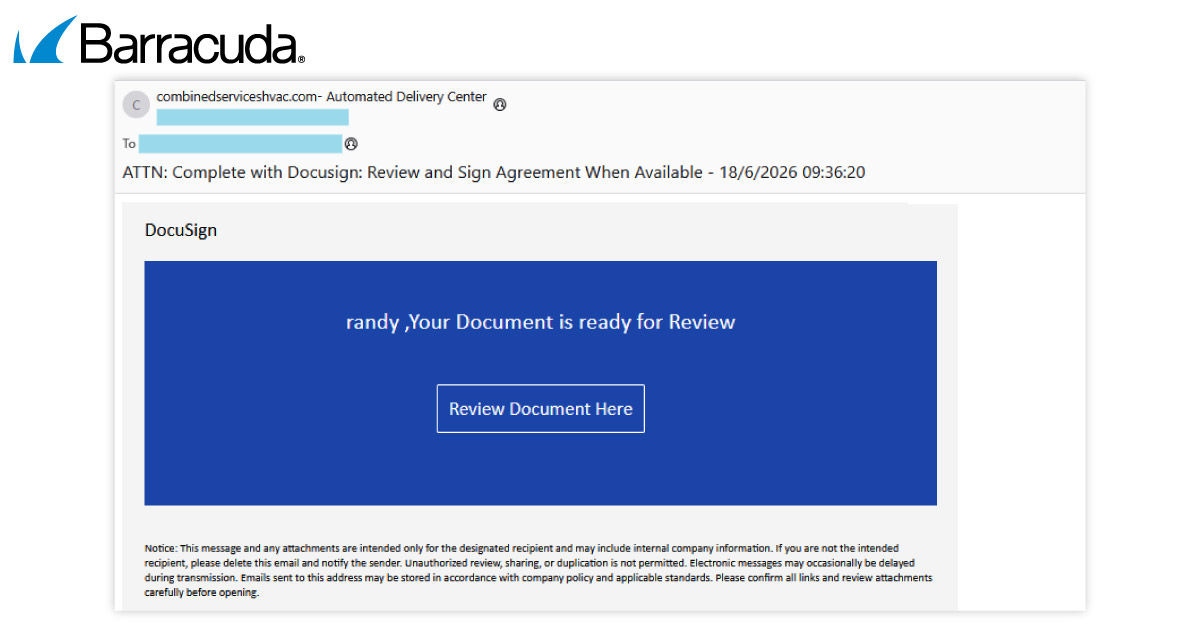
Example of a phishing email
The email also personalizes the greeting using information derived from the recipient’s email address and uses a single call-to-action button encouraging the user to review a document.
This approach creates the impression that the request originates from an internal business process rather than an external sender.
Stage 2: CAPTCHA-based evasion
When the recipient clicks the link, they do not immediately arrive at a phishing page. Instead, they encounter a CAPTCHA challenge designed to verify that the visitor is human.
CAPTCHA gates have become increasingly common in phishing operations because they can prevent automated security scanners, crawlers and sandbox environments from reaching the final payload. This allows attackers to reduce early detection and prolong the lifespan of their infrastructure.
Stage 3: An Adobe Acrobat authentication prompt
After completing the CAPTCHA, the victim is shown what appears to be a shared document together with an Adobe Acrobat-branded dialog box stating that Microsoft authentication is required to access the file.
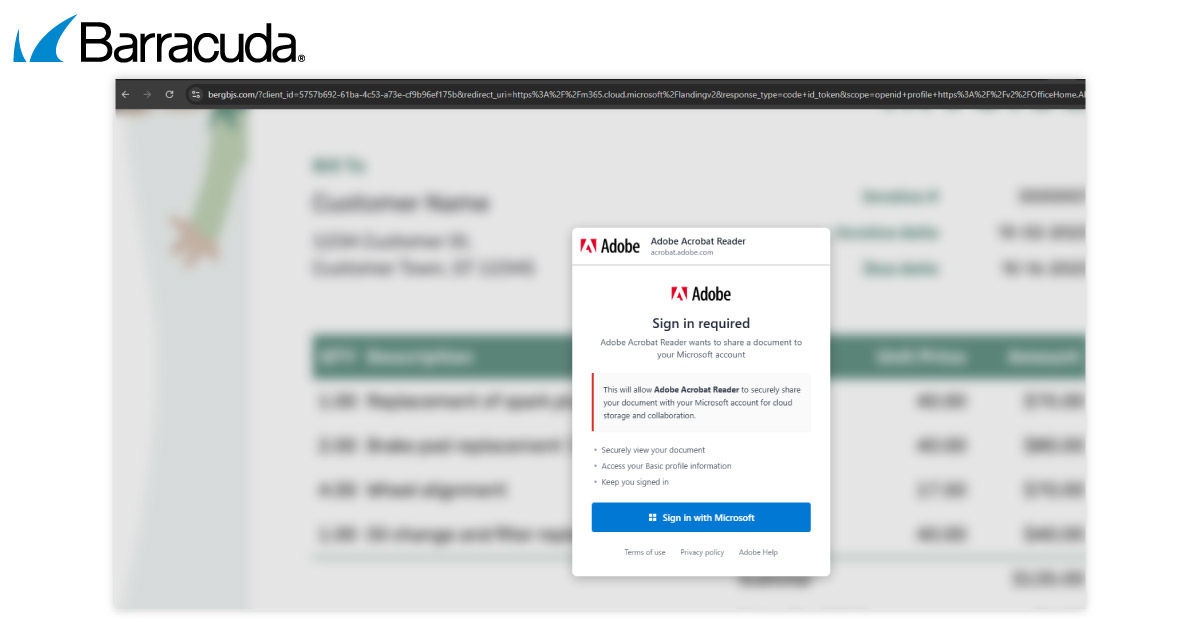
After the CAPTCHA, the victim sees a fake Adobe Acrobat Reader consent dialog overlaid on a blurred background document. The modal requests Microsoft authentication, framing a credential-harvesting step as a routine cross-platform sign-in.
The prompt presents what looks like a routine sign-in request: [Sign in with Microsoft].
This leverages a trusted relationship that employees frequently encounter in legitimate business environments. Users regularly move between document-signing platforms, file-sharing services, productivity applications, and Microsoft identity services. The request therefore appears consistent with normal workplace behavior.
Trust chaining
The notable aspect of this campaign is the way multiple trusted brands are combined into a single workflow. Each brand helps reinforce the credibility of the next stage.
This represents a shift from traditional phishing approaches that typically impersonate a single vendor. Instead, attackers are exploiting the fact that employees increasingly work across interconnected cloud platforms and have become accustomed to authenticating between them.
Stage 4: Browser-in-the-browser credential theft
Clicking the Microsoft sign-in button launches the final phishing stage. Rather than opening a genuine browser-controlled login window, the page displays a simulated browser popup rendered entirely within the attacker’s webpage using HTML, CSS and JavaScript.
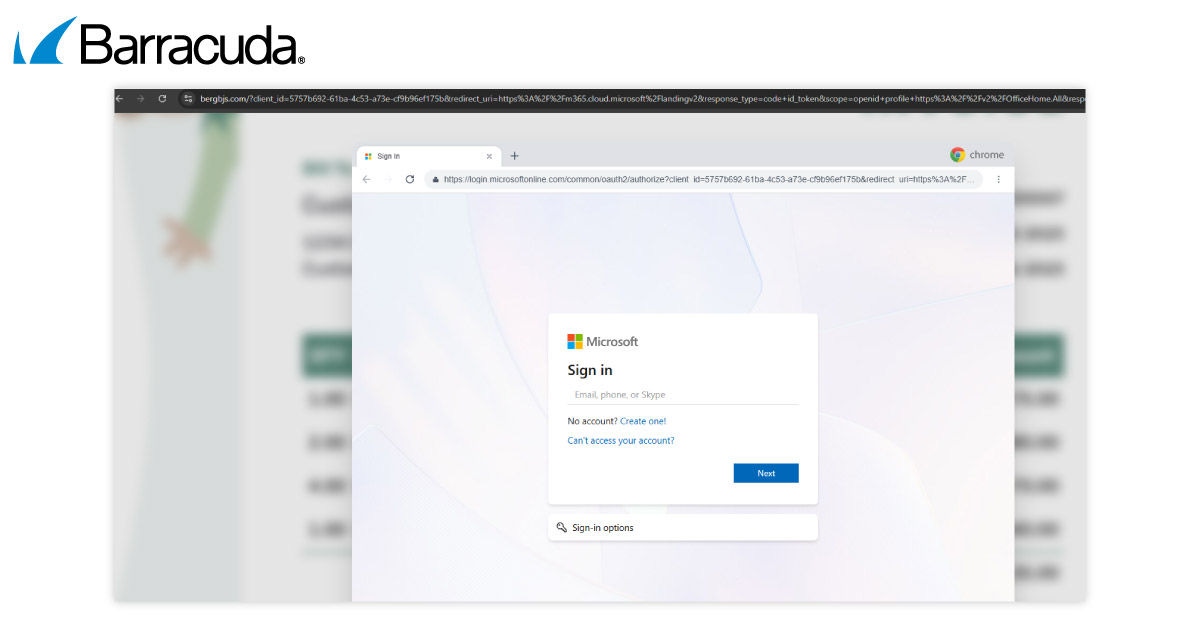
The fake Microsoft sign-in window is rendered entirely within the attacker’s page using HTML and CSS. The address bar and Chrome window are part of the page design. The real browser address bar remains on the attacker’s domain throughout.
This browser-in-the-browser (BitB) technique recreates familiar browser elements including:
- A browser title bar
- Window controls
- A browser tab
- A Microsoft-branded sign-in interface
- A realistic-looking Microsoft URL displayed in a fake address bar
To many users, the window appears identical to a legitimate Microsoft authentication popup. However, the displayed URL is simply text rendered inside the attacker’s webpage. The real browser address bar never leaves the attacker-controlled domain. Any credentials entered into the form are submitted to attacker infrastructure rather than Microsoft.
Why browser-in-the-browser is effective
Traditional phishing awareness guidance often tells users to verify a website’s URL before entering credentials. BitB attacks exploit that advice by presenting a convincing imitation of a browser window, complete with a realistic-looking Microsoft address.
As a result, users may believe they are validating a legitimate URL when they are actually viewing content controlled entirely by the attacker.
One practical way to identify a BitB attack is to test the popup window itself. A genuine browser popup can move freely around the screen as an independent browser window. A BitB popup remains confined within the webpage because it is not a real browser window.
Technical characteristics
Analysis of the landing page revealed that the phishing site was built as a modern web application rather than a simple static HTML clone.
Researchers also observed:
- Victim-specific personalization
- CAPTCHA-based anti-analysis controls
- Multi-stage redirect chains
- Microsoft-themed authentication workflows
- Embedded analytics used to monitor visitor activity
- Reusable infrastructure patterns indicating a maintained phishing kit
These findings suggest the attackers are operating a reusable and scalable platform rather than conducting a one-off phishing campaign.
How to detect and defend against such attacks
Organizations can improve detection by focusing on behaviors rather than individual domains.
For example, defenders should monitor for:
- Sender display names containing the recipient organization’s own domain
- DocuSign-themed messages that fail authentication checks
- HTML-only phishing emails with a single embedded call-to-action
- Repeated document-review themes from unfamiliar senders
Security teams should also ensure they have effective identity and access management (IAM) in place that can:
- Review user consent activity involving third-party applications
- Monitor for suspicious authentication activity following phishing alerts
- Restrict application consent where appropriate
- Require strong authentication controls for privileged users
Because phishing domains frequently change, defenders should also track:
- Reusable landing-page characteristics
- Shared analytics behavior
- CAPTCHA-gated authentication pages
- Recurring phishing-kit artifacts
- Browser-in-the-browser implementations
Organizations are also advised to update phishing awareness training for employees to reflect modern attack techniques and to harden email security. This includes enforcing DMARC, SPF and DKIM protections, deploying phishing-resistant authentication technologies such as passkeys or FIDO2 security keys where possible, inspecting redirect chains rather than evaluating only the first URL encountered, and combining layered email security with web, identity and endpoint protections.
Conclusion
This campaign highlights another evolution in phishing strategy. Rather than relying on a single fake login page, attackers build an experience that mirrors legitimate business processes from start to finish — combining multiple popular and trusted brand elements into a coherent workflow that feels familiar to modern users.





Suscríbase al blog de Barracuda.
Regístrese para recibir Threat Spotlight, comentarios de la industria y más.